GCSE Computer Science · Topic 1
Algorithms and programming
Algorithms and programming is about thinking like a computer scientist and turning ideas into working code.
We will use abstraction and decomposition, and represent algorithms in pseudocode and flowcharts.
Then we cover the programming basics: variables, data types, selection, iteration, arrays and subroutines.
- 2 subtopics
- 58 questions
- Free: 1.1 notes and 10 questions
In this topic
- 1.1Computational thinking and algorithmsFree below · 31 questions
- 1.2Programming fundamentalsOpen in Full Marks · 27 questions
1.1 · Free notes
Computational thinking and algorithms
Key points
- Abstraction removes unnecessary detail; decomposition breaks a problem into smaller sub-problems; algorithmic thinking sets out the steps to solve it.
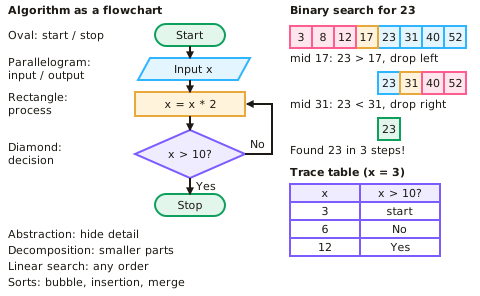
- Algorithms can be expressed as pseudocode, flowcharts or program code. Flowchart symbols: oval (start/stop), parallelogram (input/output), rectangle (process), diamond (decision).
- Linear search checks each item in turn and works on unsorted data. Binary search repeatedly halves a sorted list, so it is much faster on large sorted data.
- Bubble sort repeatedly compares and swaps adjacent items — simple but slow. Merge sort splits the list, sorts the parts and merges them — more efficient on large lists. Insertion sort builds a sorted section one item at a time.
- Algorithms can be tested with trace tables, following the value of each variable step by step.
- A structure diagram shows a problem decomposed into smaller sub-problems as a top-down tree: the whole problem at the top, with each level below breaking it into more manageable parts.
- Before coding, identify the inputs, processes and outputs of a problem. For a ticket machine: inputs are the destination and coins, the process works out the fare and change, and the outputs are the ticket and change.
In more detail
- Worked abstraction: the London Tube map keeps stations and connections but removes real distances and street layouts, because travellers don't need them.
- Worked decomposition: a quiz app splits into a question bank, displaying a question, checking the answer, keeping score and showing the results.
- Worked trace: total ← 0, then FOR i ← 1 TO 4: total ← total + i gives total = 1, 3, 6, 10 after each pass.
- Worked search comparison: 1000 sorted items need at most 10 binary search comparisons (2¹⁰ = 1024), but linear search could need 1000.
Practice
Computational thinking and algorithms: 10 questions
Pick an answer to check it, or open the answer for the explanation.
1. Which search algorithm works on an unsorted list?
- Binary search
- Linear search
- Merge search
- Both work equally
Show answer
B: Linear search. Binary search requires the data to be sorted first.
2. What is abstraction?
- Breaking a problem into smaller parts
- Removing unnecessary detail to focus on what matters
- Writing code in binary
- Testing a program
Show answer
B: Removing unnecessary detail to focus on what matters. Abstraction simplifies a problem so it can be modelled.
3. Which sort repeatedly compares and swaps adjacent values?
- Merge sort
- Insertion sort
- Bubble sort
- Binary sort
Show answer
C: Bubble sort. Bubble sort is simple to code but inefficient on large lists.
4. Which flowchart symbol represents a decision?
- Oval
- Rectangle
- Diamond
- Parallelogram
Show answer
C: Diamond. A diamond has branches for true and false.
5. What is a trace table used for?
- Storing data permanently
- Recording variable values step by step to test an algorithm
- Compiling code
- Encrypting data
Show answer
B: Recording variable values step by step to test an algorithm. It helps find logic errors by hand.
6. What is decomposition?
- Removing detail
- Breaking a problem into smaller sub-problems
- Testing code
- Sorting data
Show answer
B: Breaking a problem into smaller sub-problems. Each smaller part is easier to solve.
7. How many comparisons does binary search need at most on a sorted list of 8 items?
- 2
- 3
- 4
- 8
Show answer
B: 3. Each step halves the list: 8 → 4 → 2 → 1.
8. Which flowchart symbol shows input or output?
- Oval
- Rectangle
- Diamond
- Parallelogram
Show answer
D: Parallelogram. Rectangles show processes.
9. A list of 1,000 sorted names is searched with binary search. Roughly how many comparisons are needed at most?
- 100
- 500
- 10
- 1,000
Show answer
C: 10. Each comparison halves the list: 1,000 → 500 → ... → 1 takes about 10 steps (2^10 = 1,024). Linear search could need 1,000.
10. Which statement about merge sort is correct?
- It splits the list, sorts the parts and merges them
- It only swaps adjacent items repeatedly
- It needs the data to be already sorted
- It builds the list by checking each item in turn
Show answer
A: It splits the list, sorts the parts and merges them. Merge sort uses divide and conquer: split, sort the halves, then merge. Swapping adjacent items describes bubble sort.
Keep going in Full Marks
Full Marks has 31 questions on Computational thinking and algorithms (21 more than here), set out in practice levels. You also get notes and 3D models for all 2 subtopics of Algorithms and programming, plus games, timed exams and past papers.